
YouTube Shorts has become one of the fastest-growing formats in online video. Whether you're a seasoned creator or posting your very first clip, knowing how to make a YouTube Short is now an essential skill. With views skyrocketing to over 200 billion daily as of 2026, Shorts offer an unmatched opportunity to grow your audience, boost your channel's visibility, and tap into a trend that shows no signs of slowing down.
This complete guide walks you through the official ways to create YouTube Shorts, tips to make viral content. We'll also introduce Framia Pro as a powerful all-in-one AI creative platform that takes your YouTube video creation to the next level.
What are YouTube Shorts?
YouTube Shorts are vertical, short-form videos designed for quick consumption on mobile devices. They appear in the dedicated Shorts feed on the YouTube homepage and app, similar to TikTok or Instagram Reels.
YouTube Shorts requirements at a glance:
- Length: Up to 3 minutes (60 seconds for music-licensed content)
- Orientation: Vertical, 9:16 aspect ratio (1920×1080p resolution)
- Square format also accepted: 1:1 ratio at 1080×1080p
- Age: Creators must be 13 or older
- Upload resolution: Maximum 1080p
Shorts are perfect for hooks, quick tips, behind-the-scenes moments, trends, challenges, tutorials, or repurposed clips from longer videos. They help creators reach new audiences, increase watch time, and grow subscribers rapidly. Many creators use Shorts as a funnel to drive traffic to their long-form content.
Method 1: How to make a YouTube Short on mobile (The official app)
The simplest and most direct way to create a YouTube Short is using the official YouTube app on your smartphone. This method works on both Android and iPhone/iPad.
Step 1: Open the YouTube app and sign in
Download the YouTube app from the Google Play Store (Android) or Apple App Store (iOS/iPad). Sign in to your Google account. Make sure you're on your creator account if you manage multiple channels.
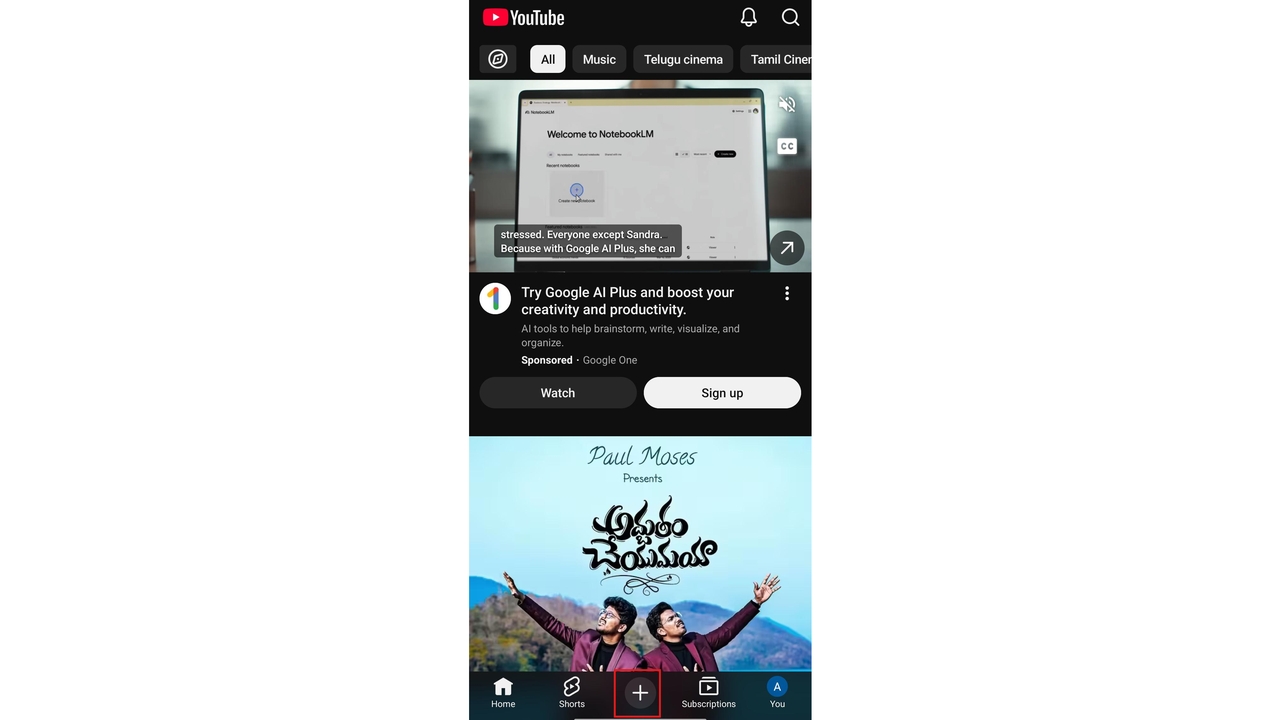
Step 2: Tap the Create button
At the bottom of your home screen, tap the "+" icon. From the menu that appears, select "Create a Short." This opens the Shorts camera interface.
Step 3: Record your Short
Press and hold the large red record button to record, or tap it once to start and again to stop. You can record multiple clips and stitch them together into a single Short using the multi-segment camera tool.
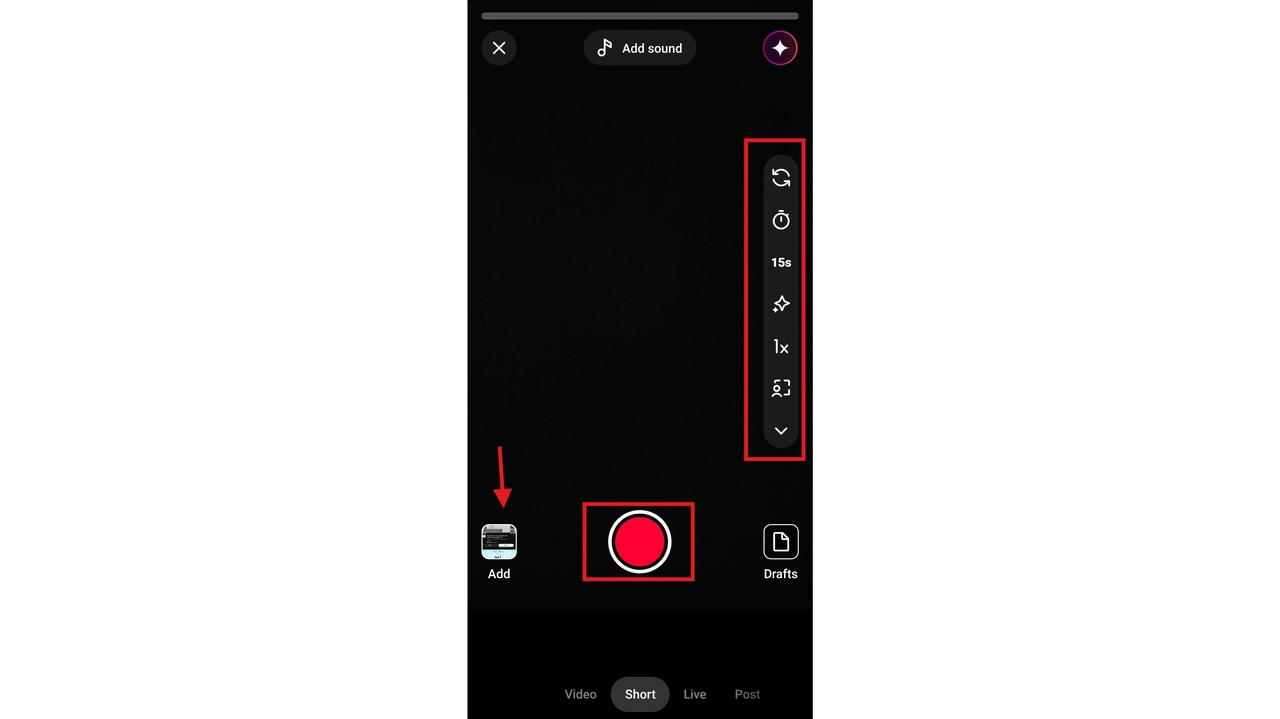
Useful recording tools include:
- Speed control — slow down or speed up your footage
- Timer — set a countdown before recording starts
- Green screen — replace your background with any image
- Retouch, Lighting, and Align — access via the downward arrow in the toolbar
You can also tap "Add" in the lower corner to import an existing video from your phone's camera roll instead of recording fresh.
Step 4: Edit your Short
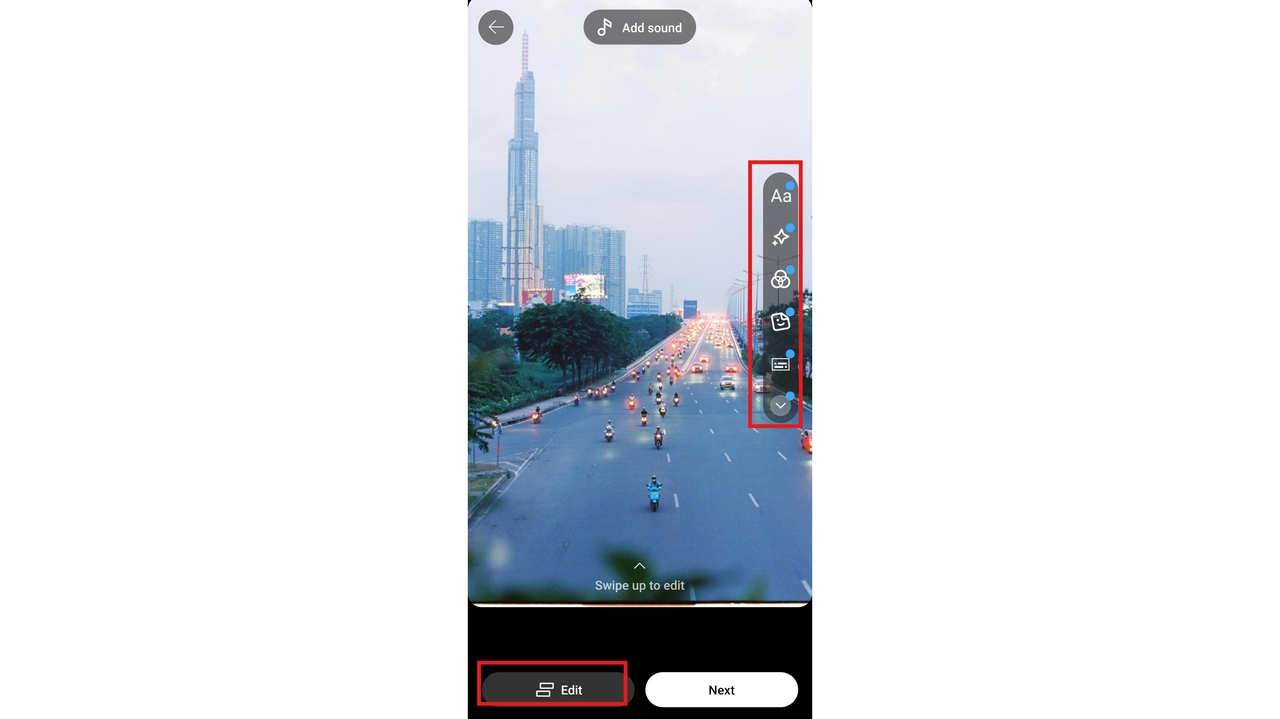
After recording, use YouTube’s built-in video editing tools to enhance your video. You can add music, text overlays, filters, adjust clip timing, and control video speed. You can also tap "Timeline" to see all your clips laid out and trim them precisely.
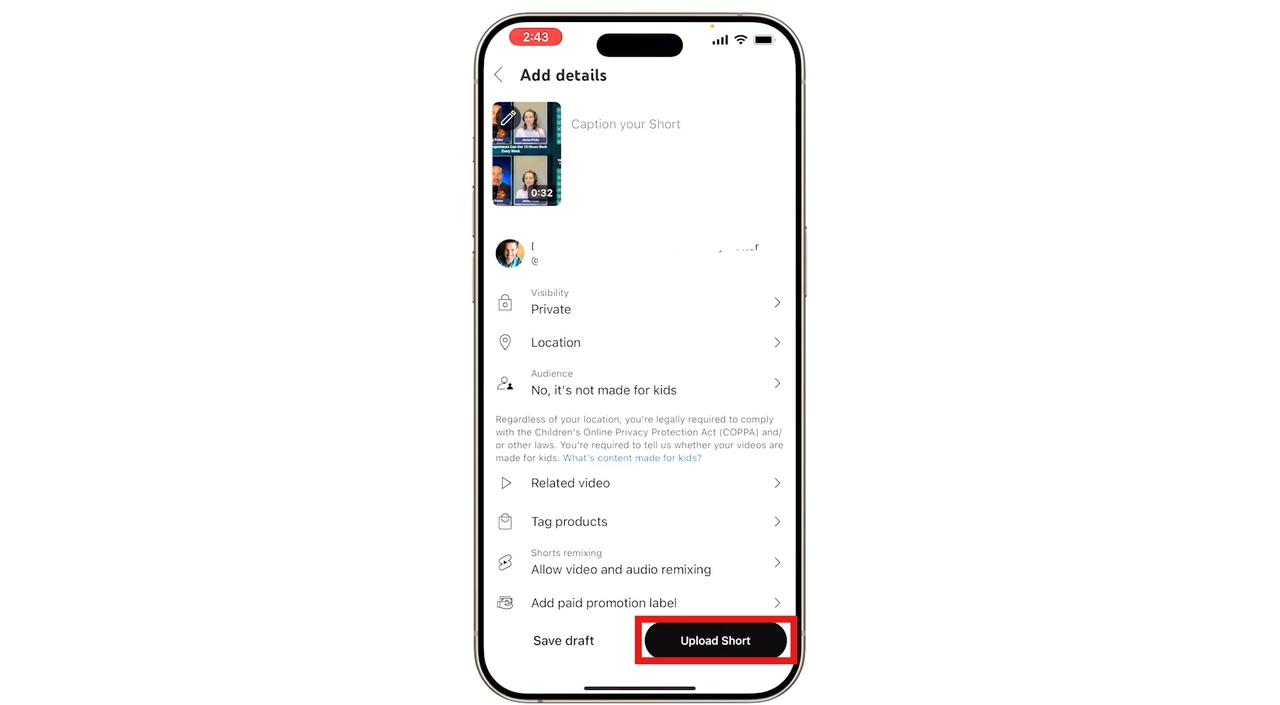
Step 5: Add details and publish
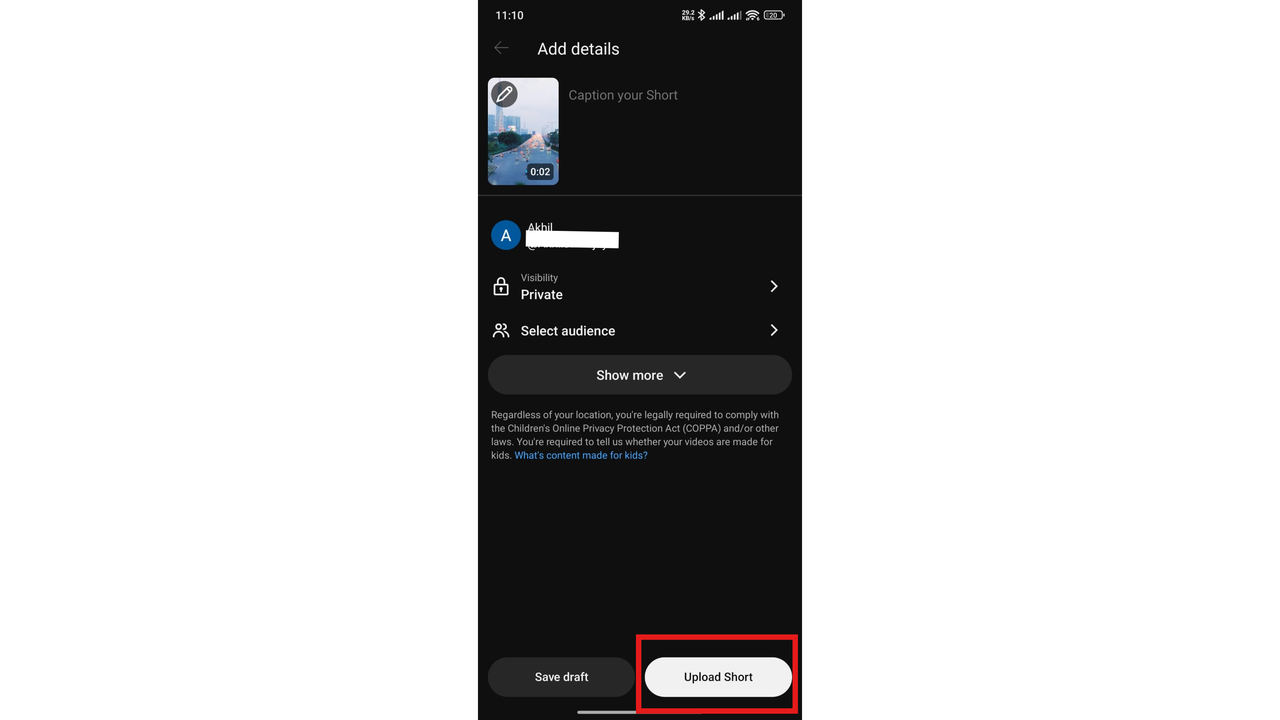
Tap "Next" to move to the publishing screen. Here you'll:
- Write a title (up to 100 characters)
- Set privacy: Public, Private, or Unlisted
- Choose your audience (Made for Kids or not)
- Schedule your Short for a future time or publish immediately
When you're ready, tap "Upload Short." Your video will appear in the Shorts tab on your channel and in the Shorts feed.
Method 2: How to make a YouTube Short from an existing video
Already have a longer video published on YouTube? You can repurpose it into a Short directly from the app—no re-recording needed. Learning how to make a short from a youtube video is one of the most efficient ways to breathe new life into your library and drive traffic back to your main content.
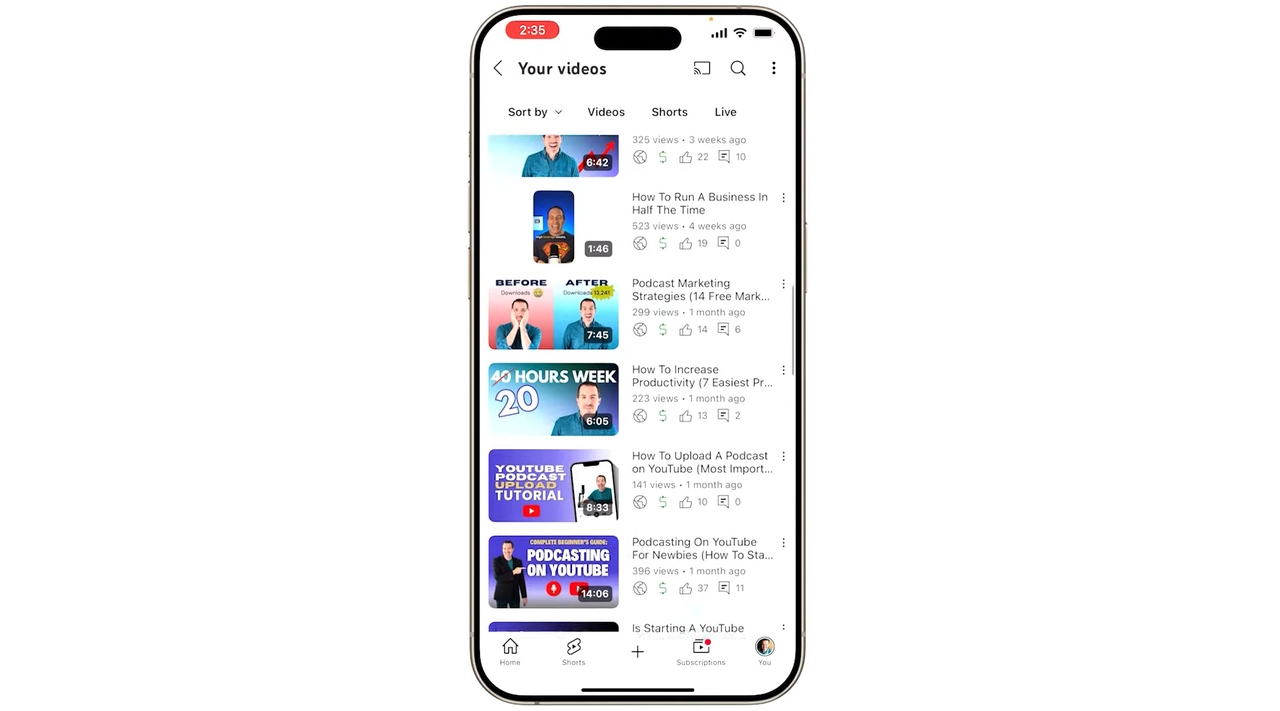
Step 1: Find your video
Open the YouTube app and navigate to the watch page of the video you want to clip from. This works for your own published videos.
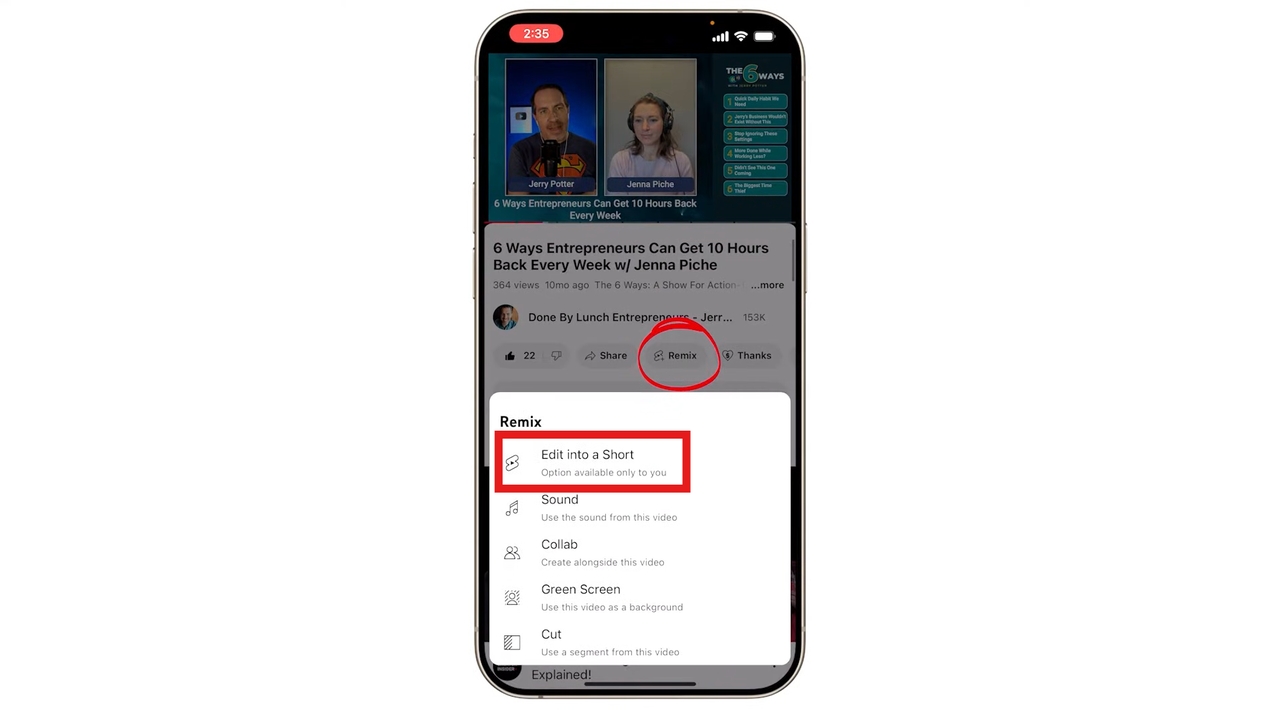
Step 2: Tap the "Remix" button
On the video's watch page, tap the "Remix" icon, then select "Edit into a Short." This option will open the video inside the Shorts creation interface.
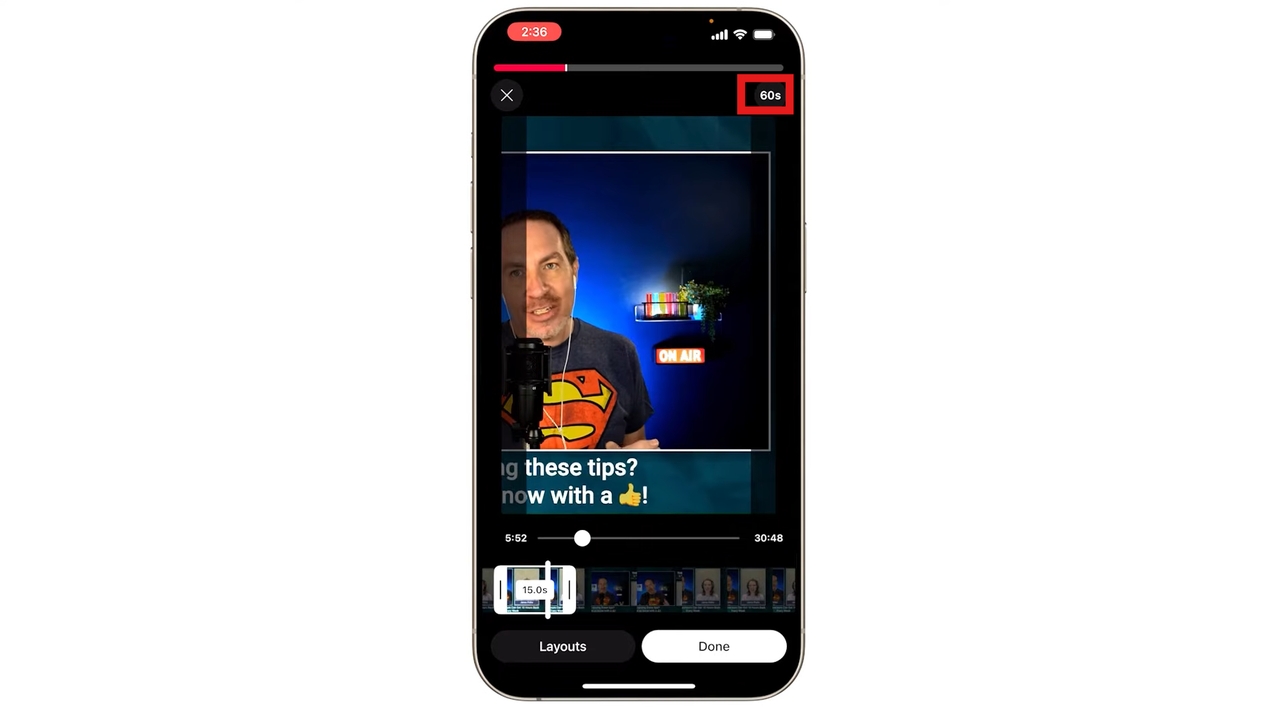
Step 3: Select your clip
You'll be prompted to choose a segment from the video. Select up to 60 seconds of footage to use as your Short. Drag the handles on the timeline to define the start and end points.
Step 4: Customize and upload
Once your clip is selected, tap "Next" to access the editing tools — the same music, text, effects, and filter options as the standard Shorts camera.
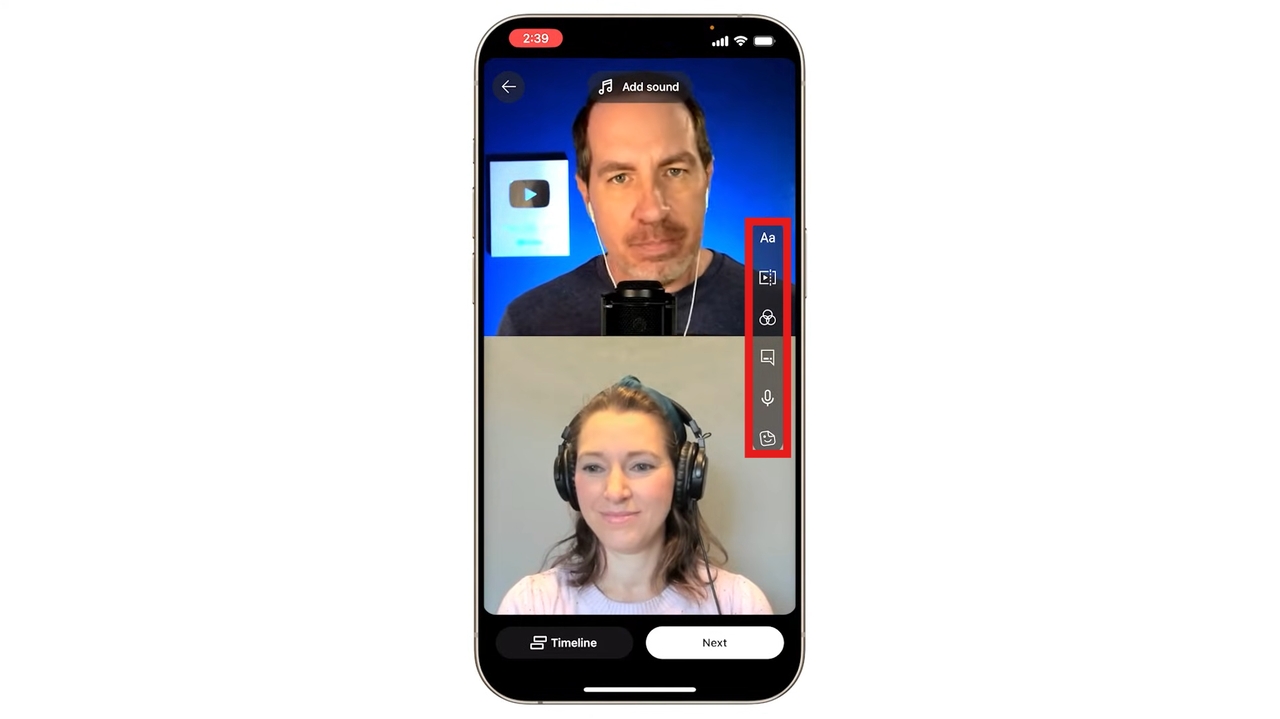
When you're satisfied, set your privacy options and tap "Upload Short" to publish.
This is an excellent strategy for repurposing your best long-form content to attract new viewers to your channel.
Meet Framia Pro: The smarter way to make YouTube Shorts
While YouTube's built-in tools are great for quick, on-the-go Shorts, creators who want to produce professional, high-quality content consistently will benefit enormously from a dedicated creative platform. Framia Pro is an AI-powered all-in-one creative agent built specifically for creators.
Rather than juggling multiple apps for scripting, recording, editing, and publishing, Framia Pro consolidates everything into a single intelligent workspace. It connects world-class AI models, including Google Gemini 3.0, Sora 2, and Veo 3.1, and gives you a guided, agent-driven workflow for creating polished content from scratch.
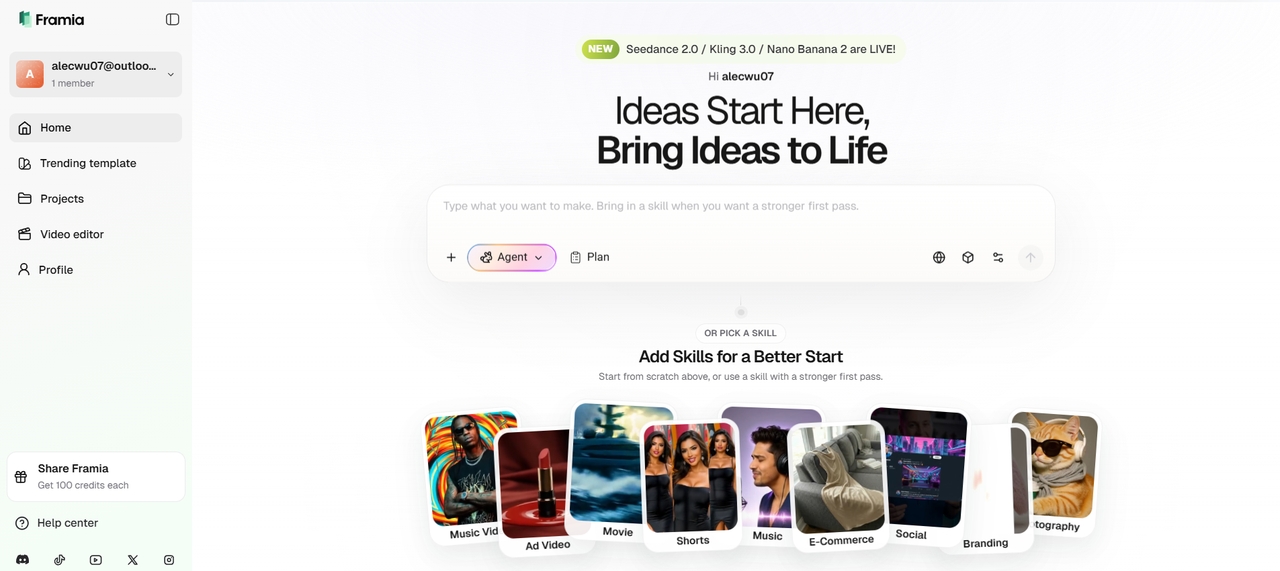
With its dedicated Shorts Agent, you can simply describe your idea in plain language and get a complete, upload-ready vertical video in minutes, complete with script, natural voiceover, trending music, auto-captions, smooth transitions, effects, and algorithm-friendly pacing.
Notable features of Framia Pro
- Dedicated Shorts Agent: Framia Pro includes a dedicated Shorts Agent — part of its broader suite of creative agents — that guides you through the process of ideating and producing short-form vertical content. Instead of figuring out settings and workflows on your own, you describe your vision and the agent handles the creative direction.
- Access to world-class AI video models: Framia Pro connects you to multiple top-tier video generation models on a single canvas, including Kling 3.0, Veo 3.1 Fast, Sora 2, Seedance 2.0, and Kling 2.6. You don't need separate subscriptions for each; everything runs from one platform.
- Multi-format creative Agents: While Shorts is the focus here, Framia Pro is a full creative suite that also supports Music Video, Ad, Movie, Social, Branding, E-commerce, and Photography workflows. This makes it an ideal long-term investment for creators who produce content across multiple formats and platforms.
- Character-consistent video generation One of the biggest challenges in AI-generated video is maintaining visual consistency across scenes. Framia Pro is specifically engineered for character-consistent video generation, meaning your subjects, styles, and visual elements stay coherent from clip to clip — crucial for storytelling Shorts and branded content.
- Real-time previews & fast iterations: Generate previews instantly and regenerate shots or elements on demand. Make quick refinements through natural conversation, ensuring your YouTube Shorts look polished and perform better in the feed.
How to make a viral YouTube Short using Framia Pro
Creating professional YouTube Shorts with Framia Pro is incredibly simple thanks to its agent-driven workflow. Here's the easy step-by-step process:
Step 1: Sign up and select the Shorts Agent
Head to Framia Pro website and create your account. Once inside, select the Shorts Agent from the creative agents menu, which pre-configures your entire workflow for vertical short-form content from the start.
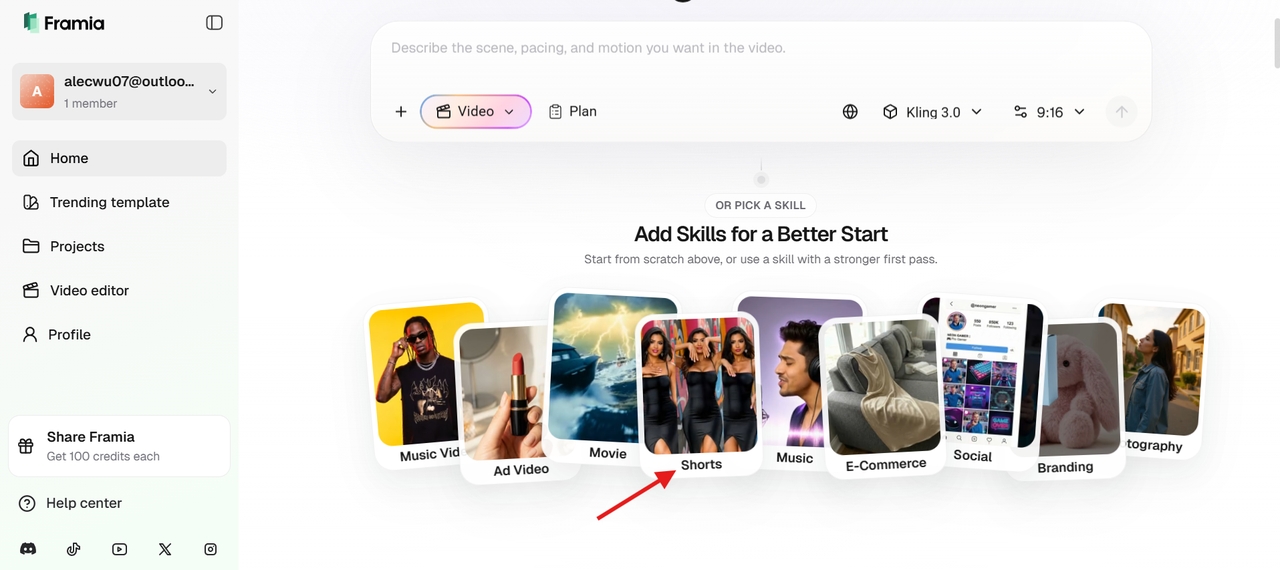
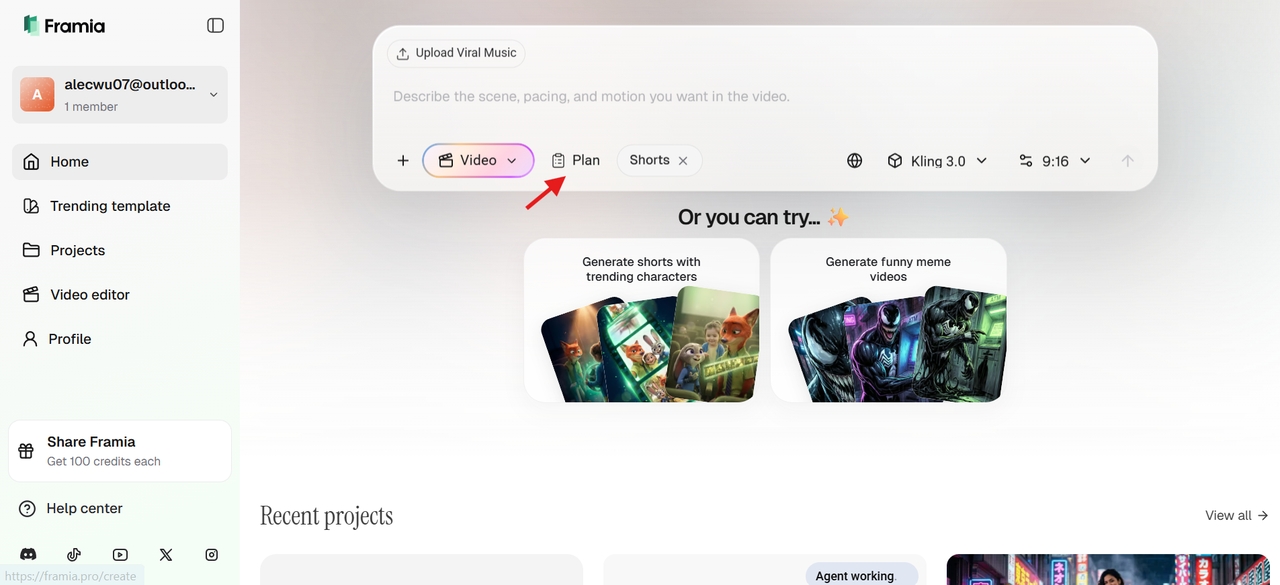
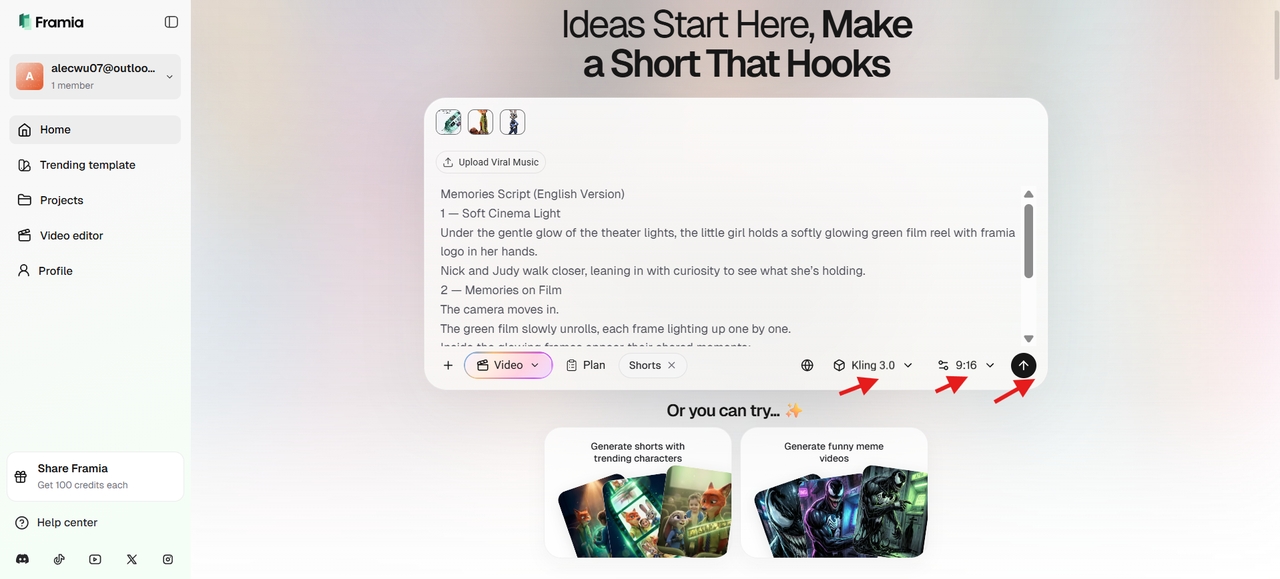
Step 2: Describe your vision and click "Plan"
Write your prompt and upload any reference images to guide the generation, then click "Plan" to outline everything with AI. The Shorts Agent confirms your video script, storyboard, and audio plan before anything is generated, so you stay in control of the direction from the start.
Step 3: Select your model and generate
Pick a video model, set your duration and aspect ratio to 9:16 for YouTube Shorts, then click "Generate" to turn your prompt into a video clip. Choose from models like Kling 3.0, Sora 2, or Veo 3.1 depending on your plan. Preview the result instantly in real time.
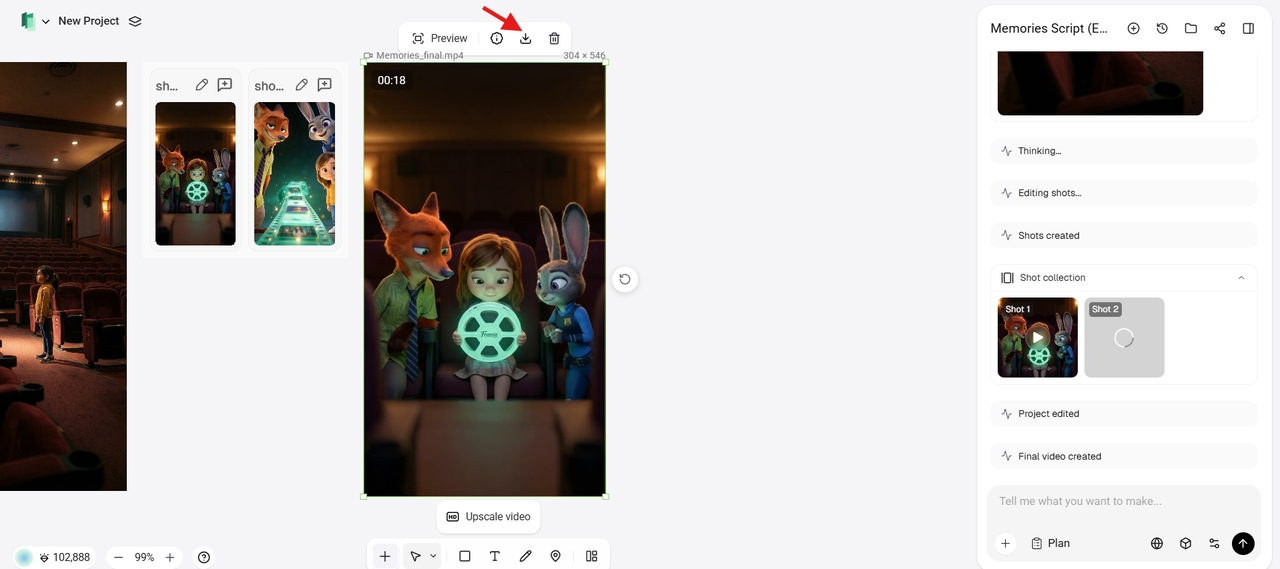
Step 4: Refine and download
Preview the result, open in the Storyboard editor or use follow-up prompts to tweak visuals or timing, then click "Download" to save your video. Upload the watermark-free file to YouTube Studio, set it to 9:16, and publish it as Public to maximize reach in the Shorts feed.
YouTube Shorts ideas to get you started
Not sure what to create? Here are proven content formats that consistently perform well in the Shorts feed:
- Educational Shorts: Break down a complex topic into a single, digestible tip. "Did you know...?" and "3 facts about..." formats work exceptionally well because they deliver instant value and encourage replays.
- How-to and tutorial Shorts: Quick step-by-step guides perform strongly across every niche — cooking, fitness, tech, beauty, finance, and more. Keep it to one skill or technique per Short for maximum clarity.
- Behind-the-scenes Shorts: Show your audience what goes on behind your content, product, or brand. Authenticity drives engagement, and viewers love seeing the human side of creators.
- Trending audio and challenges: Hop on trending sounds, memes, or viral challenges relevant to your niche. The Shorts algorithm actively surfaces content using popular audio, giving your video an instant discoverability boost.
- Transformations and before/after: Whether it's a room makeover, a fitness journey, a design project, or a recipe result — transformation content is visually compelling and highly shareable.
- Reaction and commentary Shorts: Share a quick take on a trending topic, news story, or viral moment in your niche. Position yourself as a go-to voice and build authority with your audience.
- Product reviews and recommendations: Short, punchy product reviews or "top picks" Shorts drive high engagement and are especially effective for monetization through affiliate links and brand deals.
- Motivational and quote Shorts: Simple text-on-screen or voiceover motivational content performs consistently well, especially in niches like self-improvement, fitness, and entrepreneurship.
- Repurposed long-form content: Clip the best 30–60 seconds from your existing YouTube videos and publish them as Shorts. This drives traffic back to your full-length content while giving the Short its own discoverability.
Tips for making viral YouTube Shorts
Creating a Short is one thing — creating one that actually gets views is another. Here are the most effective strategies:
- Hook viewers in the first 2 seconds: The Shorts feed is highly competitive. If you don't grab attention immediately with a bold visual, question, or statement, viewers will scroll past. Make your opening unmissable.
- Keep it tight and purposeful: Every second counts. Remove any filler, slow moments, or dead air. Your Short should feel like it moves at exactly the right pace from start to finish.
- Use captions. Many viewers watch without sound. Adding text captions keeps your content accessible and significantly improves watch time and engagement.
- Post consistently: The YouTube Shorts algorithm rewards creators who post regularly. Experts recommend at least once per week, with more frequent posting (2–3 times daily) accelerating growth significantly.
- Use relevant hashtags: Include keywords in your title and description. This helps YouTube categorize your content and surface it in relevant searches — which directly contributes to views.
- Analyze your data: Check YouTube Analytics regularly. If viewers are dropping off at the 20-second mark of a 60-second Short, trim it down. Let performance data guide your content strategy.
- Experiment with formats: Try tutorials, reactions, behind-the-scenes clips, storytelling, and trending challenges. Find what resonates with your specific audience and double down on it.
Conclusion
Mastering how to make a YouTube Short is one of the smartest ways to grow your channel in 2026. Whether you start with the official YouTube app on mobile, PC, or iPad, converting existing videos, consistency and strong hooks are key to success. However, creators who want to produce Shorts more efficiently and consistently can benefit from using advanced tools like Framia Pro. This takes your Shorts creation to the next level by turning simple ideas into polished, viral-ready vertical videos in minutes — complete with script, voiceover, music, captions, and effects.
Start creating today, experiment with proven ideas, post consistently, and watch your views, engagement, and subscribers grow rapidly. The Shorts revolution is here — don't miss it!
FAQs
- How do you make a YouTube Short?
You can make a YouTube Short directly in the YouTube app by tapping the "+" button and selecting "Create a Short." Record your clip (up to 60 seconds), edit it with music, text, and effects using the built-in toolbar, then tap "Upload Short" to publish. You can also upload a pre-recorded vertical video (9:16 aspect ratio, up to 3 minutes), or use an AI platform like Framia Pro to generate a fully produced short video from a text prompt.
- How do I convert my YouTube video to a Short?
To learn how to make a YouTube video as Short, open the YouTube app, go to the watch page of any of your published videos, and tap the "Remix" icon. Select "Edit into a Short", choose up to 60 seconds of footage by dragging the timeline handles, add music, text, captions, or effects in the editor, and tap "Upload Short" to publish.
- How do you make YouTube Shorts public?
During the final upload step, navigate to the "Visibility" settings. Select "Public" to ensure it appears in the global Shorts feed. You can also choose "Schedule" to release it at a peak time. Don't forget to set your audience (e.g., "Not Made for Kids") to ensure all social features like comments are enabled.
- What do YouTubers use to make Shorts?
Most creators start with the built-in YouTube app for quick recording and editing on mobile. For more polished, professional results, popular options include dedicated AI creative platforms like Framia Pro to generate complete Shorts from text prompts with script, voiceover, music, and effects.
- How long should a YouTube Short be?
A YouTube Short can be up to 3 minutes (180 seconds) long as of 2026. However, if you use licensed music from the YouTube library, the limit is typically 60 seconds. For maximum engagement, aim for 15–60 seconds; shorter videos often have higher completion rates, which the algorithm favors when pushing content to new viewers.